


⚡️ 1-Minute DISCO Download
Main Takeaway
Mastering ediscovery search requires more than just software; it demands a tactical playbook. By following a structured three-step process – planning scope, setting criteria like metadata and custodians, and validating logic – legal teams ensure results are accurate and production-ready.
💬Key Quote
No matter how advanced the software, your results are critically dependent on how you run an ediscovery search.
🌊 Dive Deeper
To build a reliable framework, head to the section, “How to Run an Ediscovery Search.” It details the essential workflow – from pre-search planning and mapping scope to validating logic.
There’s no argument: from the days of manual review to today’s powerful, AI-driven ediscovery platforms capable of sorting terabytes of data in seconds, ediscovery has evolved. But no matter how advanced the software, your results are critically dependent on how you run an ediscovery search — specifically, how those queries are planned, executed, and refined across teams and cases.
This guide breaks down the techniques, technologies, and tactical decisions that drive successful ediscovery searching, giving teams a complete operational playbook for searches that are faster, smarter, and more legally sound.
Need help right away? DISCO’s end-to-end ediscovery services provide expert support, rapid results, and a defensible process — powered by AI and backed by experienced legal technologists.
Understanding ediscovery search software
Ediscovery search software works by extracting and storing text, fields, and file attributes (a process known as indexing) so legal teams can locate relevant data fast. But behind that speed lies complexity — metadata mapping, database structure, review integration, and workflow coordination — all of which shape the accuracy and impact of every search.
Key components typically include:
- Indexing engines that tokenize and catalog all text, metadata, and file types for fast retrieval
- Database structures designed for high-volume storage and rapid query performance
- Metadata extraction that captures email headers, timestamps, authorship, and file relationships
- Integration with review platforms to pass search results directly into tagging and production workflows
- Workflow management tools that help teams save searches, annotate documents, and share results
Together, these components determine what can be searched, how precisely results are returned, and how easily teams can collaborate — making them the foundation for every strategic decision covered in the steps ahead.
How to run an ediscovery search: 3-step process
If you’re looking for a reliable framework for how to run an ediscovery search, this process outlines exactly what’s needed, from pre-search planning to validation and execution.
- Pre-search planning: Define scope, objectives, and exclusions.
- Setting up search criteria: Identify custodians, date ranges, file types, and metadata fields.
- Executing the search: Validate logic, monitor results, and apply quality control.
1. Pre-search planning
- Goal: Define the scope of your search.
- Focus: What are you looking for — and who can help you find it?
- Activities: Review custodian interview notes or questionnaires to surface terminology, shorthand, and timelines.
Start with the notes from your custodian interviews or questionnaires to uncover internal shorthand, acronyms, and project nicknames that may influence search terms. For instance, an initiative called “Phoenix” might appear in emails as “PX” or “red folder.”
Next, map the scope: What you’re looking for, where it’s stored, and how it was shared. This includes file types, communication channels, and date ranges.
2. Set up ediscovery search criteria
- Goal: Translate your scope into precise, targeted search inputs.
- Focus: Whose data will you search — and how will you narrow it effectively?
- Activities: Select custodians for inclusion, define date ranges, specify file types or other metadata fields, and define any exclusions to expose real communication patterns and data sources.
With your scope in hand, select the most relevant custodians — these are the ones whose inboxes, chats, cloud folders, and drives you will search. Set strategic date ranges: wide enough to catch context, narrow enough to reduce noise. Then, layer in metadata limitations like file types or formats, subject lines, and domains. Finally, add in exclusionary terms to filter out what you know you do not want to see in your results. This is where scoping becomes targeting.
This becomes the ediscovery search criteria that guides your strategy.
3. Executing the search
- Goal: Return accurate and defensible results.
- Focus: Is the logic sound — and are the results usable?
Activities: Validate search logic on sample data, review hit counts, adjust for over- or under-inclusiveness, monitor results, and apply quality control before production or review.
Before launching a full review, validate your logic on a sample set. Look for gaps or irrelevant hits, and adjust terms as needed. Use known responsive docs to test term accuracy and richness. Then, monitor results in real time – check hit counts, flag errors, and apply quality control with tagging, batching, and audit trails.
This is where your work becomes production-ready – and where defensibility takes shape.
With a solid foundation in place, the next step is execution strategy: building smarter searches that capture what matters and skip what doesn’t. That starts with mastering Boolean logic.
Mastering Boolean operators in ediscovery search
Boolean logic is the backbone of precise ediscovery search, giving you the language you need to tell the search engine exactly which documents you're looking for. As a result, mastering ediscovery Boolean search techniques is essential to running faster, more focused, and more effective searches.
Boolean logic fundamentals
Boolean logic uses simple operators — AND, OR, and NOT — to build search queries that narrow, broaden, or exclude results.
AND limits results to documents containing all specified terms (e.g., contract AND breach).
OR expands results to include any listed term (e.g., contract OR agreement).
NOT excludes terms that would introduce irrelevant content. This helps you filter out irrelevant terms (e.g., contract! NOT contractor).
Parentheses group related terms and control the order of operations, just as they do in math. For example,
(termination OR breach) AND (contract OR agree)
The parentheses ensure the platform looks for at least one term from each group. Without parentheses, the engine might misread your intent and miss key documents.
Need help designing ediscovery searches that work as intended? Reach out to DISCO Professional Services. With more than 600 years of combined experience in legal processes and technology, our Professional Services team is on hand to help with ediscovery search, collection, managed review, and all your case needs.
Advanced boolean strategies
To take your ediscovery Boolean searches further, you can build nested queries and sub-queries, grouping related terms with parentheses and combining them using multiple operators. For example:
((“project X” OR “PX”) AND (delay OR overbudget)) NOT (“final report”)
This structure isolates discussions about project delays or budget overruns while excluding post-mortem documentation.
Proximity operators
Ediscovery platforms use proximity operators to control the distance between words or phrases. You’ll type the operator directly into the search bar as part of the query.
Proximity operators like /5 (alternatively, NEAR/5 or w/5) or +3 lets you search for terms that appear within a certain number of words of each other.
For example:
“Anderson" /5 "merger”
This query returns documents where Anderson appears within five words of merger, in any order — capturing variations like “the merger involving Anderson Corp.” or “Anderson approved the finalized merger.” Substituting + for / in the same query returns documents where Anderson precedes merger by 5 or fewer words.
Proximity logic sharpens recall by eliminating scattered references and surfacing tightly related concepts — especially useful in long emails, dense reports, or narrative-rich documents.
💡Tip: When results seem off, check for missing or mismatched parentheses, test logic in small chunks, and review operator order to catch query errors before they compound.
Deepen your command of Boolean logic in DISCO. Check out the DISCO Search Syntax Manual for a full guide to operators, modifiers, and advanced examples.
Ediscovery content search strategies
Beyond keyword and Boolean logic, effective ediscovery search depends on understanding how content is stored, processed, and made searchable. That’s where strategic ediscovery content search comes in — covering everything from full-text queries to metadata fields and embedded file extraction, each with its own tools, constraints, and techniques for surfacing responsive information.
Full-text search capabilities
Full-text search allows ediscovery platforms to scan and retrieve content from the body of documents, emails, PDFs, and more, but the accuracy of that search depends on how the content is indexed.
Native files like Word documents, emails, and spreadsheets are typically straightforward to process because their text is already machine-readable.
In contrast, image-based documents — such as scanned contracts or screenshots — require Optical Character Recognition (OCR) to convert visual text into searchable content. OCR can misread characters in poor-quality scans, leading to missed hits or partial results.
💡Tip: If you’re relying heavily on OCR, validate search accuracy by sampling results and manually reviewing high-risk files.
Non-standard formats like CAD drawings, legacy system exports, or proprietary databases often require custom extraction methods or format-specific plug-ins to make them searchable.
Action: Flag these files during ingestion and work with IT or your ediscovery provider to determine whether specialized processing or conversion is needed.
Metadata searching
Metadata is the digital fingerprint of a document, providing reliable and objective insights into that document. As a result, searching across metadata fields can give you powerful control over how documents are filtered, grouped, and reviewed, often without needing to rely on keywords at all. Common file metadata fields include author, creation date, file name, file path, and modification history. These can help pinpoint draft versions, identify sources, or map document flow across departments.
Email metadata is a key subset, with fields like sender, recipient, subject line, and timestamp. These allow you to isolate communication threads by participant or date, even if you don’t know the contents of the message.
Used together, these fields let you cut directly to the who, what, when, and where – without having to guess the keywords.
Learn more about searching email metadata specifically in this guide on searching email contents and metadata.
Attachment and embedded content search
Compressed files like ZIP or RAR archives can conceal responsive data several layers deep. To ensure comprehensive search coverage:
- Confirm automatic extraction is enabled in your ediscovery platform during ingestion.
- Check extraction depth settings — some tools only process one layer deep by default. Increase the depth to capture nested files and subfolders.
- Examine filepaths to identify documents that originated from compressed sources if extra review is needed.
Email attachments are typically extracted as separate files by review platforms, so it's important to search both the parent email and its attachments to ensure complete coverage. This is especially critical when key evidence may live in forwarded documents, not in the body of a message.
Embedded objects, such as spreadsheets pasted into Word files or images within emails, present another layer of complexity. These aren’t always indexed by default. To avoid gaps, confirm that your ediscovery platform supports deep content parsing and is configured to extract embedded layers during processing.
Keyword search examples and best practices
Effective keyword search starts with understanding how terms behave in real-world context. These examples and techniques will help you surface responsive documents, reduce noise, and align with how your custodians and industry actually communicate.
Basic ediscovery keyword search examples
There are four foundational ways to approach ediscovery keyword searches:
- Single-term searches
- Exact phrases
- Asterisks
- Truncation
To understand how they work, let’s look at some ediscovery keyword search examples.
Single-term searches
This is the starting point for any keyword strategy — simple but effective when used with context in mind. A search for agreement, for example, can quickly surface contracts, but also risks pulling unrelated hits because of the common usage of the term.
Exact phrases
Phrase searches are enclosed in quotation marks to return only exact matches. For example: "termination clause" or "material breach." These are especially helpful for targeting legal language or locating specific sections of contracts and filings.
Wildcards (*)
Note: Asterisks and exclamation points operate differently in different platforms, so – while the following sections provide guidance, check your search syntax manual to ensure you’re using these correctly for your platform.
Acting as wildcards, asterisks allow you to catch spelling variants and related word forms. Simply replace one or more characters in the search query, like this:
- wom*n – captures both “woman” and “women”
- *ware – matches “software,” “malware,” “hardware”
- comp*ware – could return “computerware,” “complianceware,” “companyware” (depending on index and match rules)
Note: Asterisks are usually placed at the end of a word, but DISCO and other platforms allow wildcards within or at the beginning of a term, as in the second and third examples above.
Truncation
Truncation replaces the end of a root word with a wildcard to catch multiple variants. For example:
- terminat! retrieves “terminate,” “termination,” and “terminated”
- litig! captures “litigation,” “litigated,” and “litigating”
These techniques account for tense, pluralization, and stylistic variation — ensuring you surface relevant material even when phrasing differs. Used strategically, even basic keyword techniques can dramatically improve discovery speed and accuracy.
Note: In DISCO, asterisks are single-character, mandatory wildcards -- meaning if you search for apple*, you'd return only results including apples or applet, but not apple. Meanwhile, exclamation points are truncators in DISCO.
‼️Pro tip about truncators and performance
If you have a lot of documents and a lot of terms, truncators and wildcards can negatively affect search performance. So, if the terms you're looking to expand with a truncator are things like litig!, you may be better off just spelling out the exact terms you're looking for.
Industry-specific search examples
In commercial litigation, the most effective keywords are often tied to the underlying dispute, not the document title or named parties. That’s because case documents rarely mirror the phrasing used in pleadings — they reflect how the issue was discussed internally.
For example, searching “material breach” or “force majeure” will likely yield more relevant hits than the official name of the agreement. Keywords like “indemn!”” or “terms and conditions” surface the operative language where liability and obligations are defined.
Here are examples of industry-specific keywords that can quickly surface responsive material:
Contracts: Use terms such as “non-disclosure” OR “unauthorized disclosure”, “licensing”, or “service level!” to locate clauses related to confidentiality, usage rights, and service commitments.
Financial and accounting: Look for red-flag terms like “off-the-books”, backdating, “round-tripping”, “revenue recognition”, or “override controls” to identify potential fraud or earnings manipulation.
Accounting oversight: Combine fraud keywords with accounting structures like “general ledger”, “audit trail”, or reconciliation to uncover breakdowns in internal controls or bookkeeping anomalies.
Regulatory compliance: Tailor your search to include terms like “regulatory filing”, “SEC correspondence”, HIPAA, GDPR, or “compliance breach”, depending on the governing regulations for your industry.
Intellectual property: Search for (replica OR fake OR counterfeit) /5 “[product name]”, , “source code”, “patent application”, or (sample OR soundalike) to isolate documents that speak directly to IP ownership, infringement, or misappropriation.
Communication pattern searches
Understanding how people communicate — who talks to whom, when, and through which channels — can reveal critical insights that content-based keyword searches alone may miss. These patterns help reconstruct timelines, uncover privileged knowledge, and identify decision-makers. To surface them, it’s important to expand your search to include the structure of conversations — not just the content.
Here are some techniques for mapping those conversations across platforms, people, and time:
Meetings and calendars: Narrow your search to Calendar or Appointment filetypes, and use keywords like "meeting agenda", or "Zoom" with custodian names or discussion topics. Metadata such as appointment start and end times, organizers, attendees, and event titles help connect what was planned to what was later executed or discussed in follow-up communications.
Internal vs. external communications: Filter by domain and domain count to separate internal and external exchanges. For example, limiting to @internaldomain.com AND domaincount(1) can isolate internal conversations, while focusing on emails to or from external parties is essential when tracking disclosures, outreach, or coordination with outside entities.
Did you know? CeciliaⓇ Q&A eliminates the need for endless keyword tweaking by letting you ask plain-language questions and get sourced, fact-based answers fast. See how it works.
Advanced search techniques and optimization
Advanced search techniques give review teams precise control over how terms are interpreted and matched, especially when data is messy or inconsistently formatted. By layering in tools like proximity operators, fuzzy logic, and regular expressions, legal teams can reduce noise, surface hidden connections, and extract exactly what’s needed from large, complex datasets.
Proximity and contextual searching
Proximity operators like NEAR or /n (WITHIN, sometimes written W/n) help surface documents where two or more terms appear close together, often indicating contextual relevance that basic keyword searches might miss.
For example, the search, termination /5 contract,would return documents where those words appear within five words of each other, capturing variations like “termination of the original contract” or “contract was terminated.” Substituting a + for / in the same query returns documents where termination appears within five words preceding contract.
Most ediscovery platforms let you set distance parameters that control how close terms must appear to each other to count as a match. This helps you narrow or expand your results depending on how tightly connected the terms need to be.
Some tools also use contextual relevance scoring to rank results based on how terms appear together:
- Repeated proximity: When terms appear close together more than once in a document, it's more likely the content is relevant.
- Key placement: Matches that appear in subject lines, headings, or specific clause types (like indemnity or termination clauses) may be ranked higher than those buried in footers or signatures.
These features help prioritize the most responsive content, saving time during review and improving the accuracy of your results.
Fuzzy logic and phonetic searching
Business communications often contain typos, abbreviations, and inconsistent spelling, which can cause traditional keyword searches to miss relevant content. Plus, because of the rapid increase of more casual forms of communication – think Slack, Teams, etc. – misspellings, acronyms, and jargon are common in business communications, making phonetic search no longer niche, but critical for efficient ediscovery.
Fuzzy search techniques address this by identifying near-matches, returning results that differ from the query by a defined number of characters. For example, a fuzzy search for "termination" might also retrieve "terminaiton" or "termnation", catching common keystroke errors.
Phonetic searching takes this further by identifying words that sound alike but are spelled differently, such as "Smith" and "Smyth", using algorithms like Soundex or Metaphone.
These techniques are especially valuable when working with informal communications like emails, text messages, or chats, where spelling inconsistencies are more likely.
Additional reading: How AI Helps Solve the Precision and Recall Gap
Regular expressions in ediscovery
Regular expressions — often called regex — are powerful pattern-matching tools used to locate text that standard keyword searches can’t easily capture.
They’re especially useful for identifying patterns like phone numbers, Social Security numbers, dates, account IDs, or email addresses, regardless of formatting. For example, the regex \d{3}-\d{2}-\d{4} can match any string formatted like a U.S. Social Security number. Regex searches are also helpful for identifying terms that contain stop words or characters that aren’t indexed for searching (like % or &).
In ediscovery, teams often develop custom regex patterns tailored to unique case requirements — such as internal file naming conventions, invoice numbers, or proprietary identifiers — enabling targeted searches across large data sets. Mastery of regular expressions can help you surface precise, high-value content, and can even form the basis for mass-applying redactions.
How to create a regex
Creating a regular expression (regex) involves writing a specific pattern that matches the structure of the data you want to find. You don’t need to know every command to be effective — just a few core building blocks go a long way.
1. Know what you're looking for
Start by identifying the format of the data. Common examples include:
- Phone number: 555-123-4567
- Email address: john.doe@example.com
- Date: 03/12/2024
- Account number: ACCT-4592-AZ
2. Learn the basic components
- \d = any digit (0–9)
- \w = any word character (a–z, A–Z, 0–9, _)
- . = any single character
- + = one or more of the previous item
- * = zero or more
- {n} = exactly n of the previous item
- [] = match any one character inside brackets
- () = group elements
- | = OR (alternation)
- \ = escape character; treats the next character literally (use it to match symbols like /, ., or ?)
3. Build your pattern
- Example: U.S. Social Security number
- Format: 123-45-6789
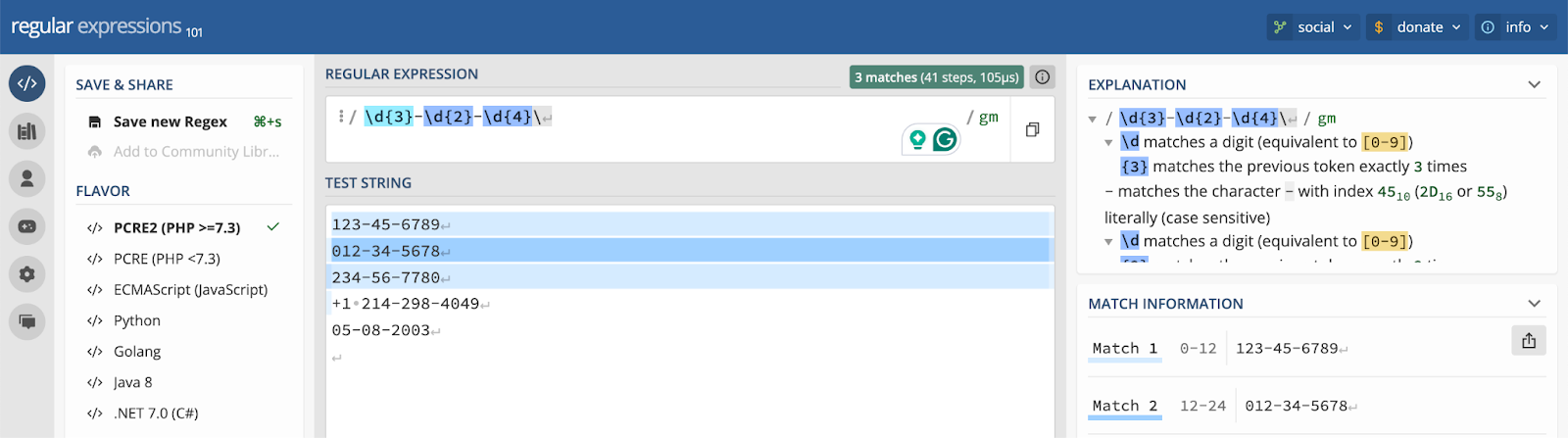
- Regex: \d{3}-\d{2}-\d{4}
- Example: Dates in MM/DD/YYYY format
- Regex: \d{2}\/\d{2}\/\d{4}
- Example: Email addresses
- Regex: [\w.-]+@[\w.-]+\.\w+
- This matches: john.doe@example.com, first_last@company.org, etc.
4. Test before deploying
Use a regex testing tool like regex101.com or RegExr to validate your expression before applying it to your ediscovery platform.
In the example below, you can see that a regex for a U.S. Social Security number correctly identifies number strings in that format.
Search performance and efficiency tips
An ediscovery search strategy is only as good as its ability to deliver results on deadline. Here are practical ways to enhance performance, refine search logic over time, and embed searching into team workflows so results are faster, cleaner, and easier to act on.
Query optimization strategies
Search speed and system performance improve dramatically when you structure queries to work with, not against, your ediscovery platform’s indexing system.
These techniques help reduce lag, avoid unnecessary system load, and return relevant results more quickly:
- Scope your set before using keywords. Narrow the dataset using fields like custodian, date, or document type before applying keyword logic. Smaller sets mean faster processing and richer results.
- Avoid overusing truncators and wildcards. Especially at the beginning of terms. Queries like !ware slow processing because they force the engine to scan the entire index for matching variations. If you know there are only a few variations of the term you are looking to return, search those variations directly (like malware OR spyware).
- Use Boolean logic strategically. Combine fields and keywords efficiently. For example:
Custodian("Smith, Jane") AND familydate(before 1/1/2021) AND ("termination clause") reduces noise and accelerates matching. - Leverage phrase and proximity searches. When supported, use "exact phrases" or NEAR/n operators. These take advantage of indexed term relationships and reduce irrelevant hits.
Iterative search methodology
Effective ediscovery search takes a broad-to-narrow approach. Start with an intentionally broad query to cast a wide net — then iterate. Scan initial results for irrelevant hits, repetitive patterns, and unexpected noise like vendor invoices or generic newsletters. From there, narrow your scope, adjust your proximity connectors, and apply exclusions to weed out irrelevant content.
Each round of refinement should be guided by review feedback: Are relevant documents getting buried? Are too many non-responsive hits slowing review? Adjust search terms, date ranges, and custodians incrementally to tighten focus without eliminating critical material.
Collaboration and workflow integration
Ediscovery workflows work best when teams treat searches as shared assets. These strategies keep everyone on the same page.
Centralize saved searches in a shared workspace and name them by function — such as:
- “Privileged comms – outside counsel”
- “Compensation terms – exec group”
This reduces redundant work and makes it easy for others to understand the purpose of each query.
Use annotations to create a running commentary inside documents. Rather than emailing notes or discussing findings in isolation, tag documents with issue codes, highlight relevant sections, and leave attorney notes for context. These annotations can guide deposition prep, support fact development, or flag hot documents early.
To maintain consistency, implement version control for complex queries. When a team member edits a Boolean string or adjusts a date range, create a new version of the search with the date and version number to ensure searches are up-to-date and accurate.
Use search term reporting, search history logs, and result snapshots as an audit trail. If results shift unexpectedly or strategy changes mid-review, these tools allow you to retrace your steps and understand how specific documents were surfaced. Good documentation here makes it easier to onboard new reviewers, defend the review process, and avoid rework.
Build team-based efficiency into every search. DISCO 101: Search & Review shows you how to collaborate effectively on search and filtering inside the platform – so your team can work in sync, reduce review time, and stay audit-ready.
Quality control and validation
Even well-constructed queries can miss key evidence or pull in irrelevant data that bloats review if not properly tested. Here are practical ways to validate your search protocols and maintain quality control throughout the process.
Search validation techniques
Every search should be tested before it’s trusted. Validation isn’t a formality — it’s how you refine queries, reduce risk, and confirm that your results are as accurate and complete as possible.
Here’s how to do it:
Before you scale a search across an entire data set, validate its accuracy using a small, representative sample of documents. Run your search and review a random selection of hits to see whether the results are genuinely responsive. Are you pulling junk? Are key documents missing? If so, adjust your terms to tighten or expand your criteria.
Use known responsive and non-responsive documents as a benchmark. If you’ve already tagged certain files, test whether your search captures them — and equally important, whether it avoids pulling the ones that don’t apply. This helps identify false positives and false negatives early, before hours of review time are wasted.
Cross-test using multiple retrieval methods. If you’re relying on search, validate with topic clustering, textual near duplicates of known responsive content, or AI-driven chatbot results where available. Divergences between the two can surface blind spots or missed patterns in your logic.
Documenting search processes
Legally, documentation isn’t always explicitly required — but it’s strongly implied and often expected. Under the Federal Rules of Civil Procedure (FRCP), particularly Rules 26(b)(1) and 26(g), parties are expected to conduct discovery in a way that is:
- Proportional to the needs of the case
- Non-duplicative and not overly burdensome
- Undertaken in good faith
If your search methods are challenged – during a meet and confer, motion to compel, or motion for sanctions – you may need to prove that your process was reasonable, targeted, and unbiased. Courts have ruled against parties whose undocumented search strategies failed to meet that standard.
Here’s how to document the how and why behind your ediscovery search strategy.
- Search terms: Use search term reporting to keep a record of the exact queries used and the results generated. Keep a tracker of your search term negotiations, noting any iterations or changes, and when and why they were made.
- Custodians and data sources: Document whose data was searched, what repositories were included (email, file shares, chat platforms), and how the scope was determined. If your platform supports saved searches or folders for search term report scoping, ensure that your scoping search or folder includes a clear description of the contents.
- Date ranges and filters: Record timeframes, file type limitations, or metadata filters used to focus the search.
- Validation and quality control steps: Note any sampling, cross-checks, or alternative methods used to verify completeness and accuracy.
- Rationale for decisions: Wherever possible, include short justifications – why certain custodians were included, why specific terms were changed, or why filters were added.
Maintain all this in a search log or protocol document that can be easily exported, dated, and shared if needed. Most review platforms let you download saved search histories and search term reports, which helps automate this step and reduce risk later.
Handling privileged and confidential material
Privilege screening is one of the highest-risk stages in discovery: miss a single protected document, and it could compromise your entire case. A strong workflow helps you identify sensitive material early, apply the right protections, and prevent inadvertent disclosure before review or production begins.
Start with a privilege term list
Include keywords like attorney!, counsel!, law firm names, known attorney names, and domain names (e.g., !@firmname.com). Use wildcards to broaden coverage:
attorney! OR counsel! OR @lawfirm.com OR domain(@lawfirm.com) OR (John /3 Doe). Note that boilerplate email footers can include common privilege terms. Make sure to test your terms to ensure you aren’t pulling in too much noise.
Use search validation techniques honed for privilege
Use the search validation techniques described above, but with an eye toward privilege. For example: use known privileged documents to test your privilege terms and develop new ones; review textual near duplicates at varying levels of similarity; or ask the in-platform AI chatbot to return communications with attorneys.
Apply privilege tags
As you identify privileged documents, tag them to ensure they aren’t inadvertently produced, and to flag them for privilege logging and redaction.
Use efficient, auditable privilege logging workflows
Route all privileged documents for secondary review by a highly skilled team in segregated, secured batches with standardized options for privilege reasons. Using this process also ensures you can produce up-to-date logs with accurate metadata (like email participants, dates, and subjects), as well as track any documents that were downgraded.
Manually review edge cases
Legal terms in business context (e.g., “strategy,” “compliance”) may trigger false positives. Use human judgment to flag ambiguous content for further review rather than risk accidental production.
Need to build a privilege log? DISCO’s Privilege Logs View features fields typically required for most privilege logs, letting you export targeted log entries and produce your logs with less effort .
Troubleshooting common search issues
Even the best-designed ediscovery searches can run into technical hiccups, data inconsistencies, or unexpected result patterns. To maintain momentum and avoid costly delays, it's critical to recognize these issues early and know how to fix them. Let’s break down the most common search challenges and walk through practical solutions for resolving them quickly.
Technical challenges
Technical issues in ediscovery search can derail timelines, compromise defensibility, and inflate costs. At best, these issues slow down review. At worst, they threaten the integrity of your entire case strategy. Here’s what those challenges typically look like — and how to resolve them before they disrupt your workflow.
Corrupt data or failed ingest
What it looks like: Search results are incomplete, searches fail, or indexing status shows errors. This is often a result of a failed ingest or corrupted file (like a corrupted PST) due to an interruption or system crash.
What to do: Pause active reviews, isolate corrupted data, and remediate or reingest the corrupted data. Some systems offer partial index rebuilds to limit downtime.
Search performance bottlenecks
What it looks like: Searches take too long to return results, or system resources spike during execution.
What to do: Complex queries run against large data sets can result in system performance issues. Offload unnecessary data sets, break queries into smaller batches, or optimize logic. For example, instead of using a truncator that requires the system to run every permutation of a term, construct your query with just the variations of the term you’re seeking. If you're on-prem, review system resource allocation. If cloud-based, contact your provider to assess infrastructure scaling.
Partial indexing of non-standard or complex files
What it looks like: Spreadsheets, PDFs with embedded images, or proprietary formats appear indexed — but key content is missing in search results. Your platform may list these files as “partial failures” or “partially corrupt.”
What to do: Isolate and remediate these files, including supplemental OCR where needed. For unsupported file types, consider a targeted manual review.
Latency and sync delays in cloud-based platforms
What it looks like: New data appears missing from search results, even after upload.
What to do: Check system sync logs or ingestion dashboards. Most cloud platforms offer indexing status indicators — wait for confirmation of completion before initiating critical searches.
Search result anomalies
Search result anomalies occur when your query delivers inconsistent, inaccurate, or unpredictable results — missing key documents or pulling in irrelevant ones. These issues can undermine confidence in the search process, complicate defensibility, and waste valuable review hours chasing false positives or re-running broken queries. For example:
Inconsistent hit counts across runs
Cause: Background indexing may not have completed or data was added mid-search.
Fix: Always confirm indexing completion before running queries. Reindex new data sets when necessary.
Unexpectedly low result counts
Cause: Overly narrow search parameters, syntax errors, or stop words or unindexed characters ignored by the engine.
Fix: Broaden queries, check for inclusion of stop words or unindexed characters, and validate syntax settings like truncators, parentheticals, and exact phrases.
Sudden drop in expected hits
Cause: Index corruption, deleted data, or modified search defaults.
Fix: Cross-check with backup datasets, rerun baseline searches, and revalidate search logic.
Excessive false positives or overinclusive hits
Cause: Use of overly broad terms, including overuse of standard Boolean operators (AND and OR), wildcards, or truncators,.
Fix: Refine terms using exact phrases, proximity operators, or phrase searches. Validate hit relevance on a document sample.
Different results for same query across reviewers
Cause: Local filters, role-based access, or unsynchronized saved search versions.
Fix: Standardize saved searches, confirm access levels, and sync platform settings across users.
Platform migration and data transfer
Even minor differences between platforms can introduce search inconsistencies or index conflicts – issues that can disrupt workflows if not proactively managed.
Here’s what to watch for:
Hit count mismatches after transfer
Cause: Deduplication, search logic, and syntax often differ across tools. Saved searches may break or behave differently after migration.
Fix: Validate document count of the search scope between platforms. Confirm all data was successfully processed in the target platform and validate deduplication behavior. Review and manually translate search strings using the target platform’s syntax guide. Run tests on representative samples to ensure fidelity.
Corrupted or missing metadata
Cause: Exporting data between incompatible formats can strip or distort metadata like timestamps, sender info, or file paths.
Fix: Use standardized export formats (e.g., load files with metadata fields mapped). Validate metadata fields in the new environment before executing searches.
Versioning conflicts or overwrites
Cause: When multiple platforms track versions differently, migrating mid-review can overwrite updated documents or lose version history.
Fix: Lock version histories before transfer. Use platform-specific import settings to preserve version metadata and change logs.
Workflow delays during validation
Cause: Teams underestimate the time required for validating search functionality after migration. Skipping this step introduces downstream risk.
Fix: Build time for search translation and testing into the project timeline. Run baseline searches from both platforms side by side to confirm consistency.
Additional reading: Refine your search strategy and resolve common pitfalls with the DISCO Search Syntax Manual and Searching in DISCO: Best Practices. These resources walk you through advanced syntax, filters, and troubleshooting techniques to help you search smarter and faster.
Regulatory and compliance considerations
From the Federal Rules of Civil Procedure to industry-specific privacy laws, search methodology must align with compliance requirements that govern scope, defensibility, and data protection. Here’s how those requirements shape what you can search – and how you do it.
Federal rules of civil procedure requirements
Under Rule 26 of the Federal Rules of Civil Procedure (FRCP), search scope must be proportional to the needs of the case, balancing the value of the information against the burden or expense of producing it. This means legal teams must demonstrate that their searches are targeted, reasonable, and not overly broad.
Proportionality affects everything from custodian selection to keyword lists and date ranges. Overly aggressive searches can trigger objections, while under-inclusive queries risk missing key evidence. A defensible approach prioritizes relevance, cost-efficiency, and transparency — often supported by documentation like search term or hit reports showing how search terms were tested and refined.
Industry-specific regulations
In regulated industries like healthcare, ediscovery search must account for strict privacy and data protection laws. HIPAA, for example, governs how protected health information (PHI) is handled during litigation, requiring safeguards to prevent unauthorized access or disclosure.
Searches involving medical records must be narrowly tailored to retrieve only what’s necessary — minimizing exposure of sensitive patient data. This often means using targeted keywords, strict date parameters, and custodian-level filtering.
Additional protections like redaction protocols or segregated review workflows help maintain compliance while preserving evidentiary value.
Additional reading: Ediscovery 101: Guide to Ediscovery Rules and Best Practices
Tech advancements and future technologies
Where we’ve been: Technology Assisted Review (TAR)
In the past decades, AI-powered tools have transformed ediscovery search by combining predictive coding (also known as Technology Assisted Review or TAR) with traditional keyword strategies to streamline review and improve accuracy. Instead of relying solely on static keyword lists, machine learning TAR models analyze reviewer decisions to prioritize documents that are most likely to be responsive — continuously improving relevance over time.
This hybrid approach reduces noise, accelerates review, and helps teams surface key documents faster. At the same time, cloud-based ediscovery platforms offer unmatched scalability and cost control.
- Eliminating infrastructure burdens
- Enabling real-time collaboration
- Scaling easily as data volumes grow — without adding complexity
With built-in automation and intelligence, solutions like DISCO deliver faster insights, tighter workflows, and defensible results that keep pace with today’s data-driven litigation.
Where we are now (and where we’re going): Generative AI and natural language search
Now, legal technology leaders like DISCO are bringing even more intuition and speed to search by integrating generative AI into ediscovery search.
DISCO’s Cecilia Q&A allows attorneys to ask natural-language questions of your case documents — like “What did [custodian] do?” or “Is there evidence of [x]?” — and get fast, factual answers backed by citations to your DISCO Ediscovery database.
This removes the complexity of, for example, crafting valid queries of Boolean logic, and makes it easy to surface relevant information with just a question. Whether you’re scoping a saved search or reviewing an excerpted source, Cecilia delivers answers you can trust — clearly linked to their underlying documents and ready for action.
Key features include:
- Natural language questioning with contextual answers and cited sources
- Jump-to-excerpt functionality for fast document navigation
- Bookmark capabilities to save important Q&A messages for later reference
- Role-based permissions for secure, collaborative use across teams
- Export and chat-clear options to support defensibility and compliance with legal hold and discovery protocols
Learn more about Cecilia’s capabilities or see how Cecilia Q&A works in your review workflow.
Conclusion
Mastering how to run an ediscovery search means going beyond basic queries to create efficient, defensible ediscovery software keyword searches that deliver results on deadline.
It’s a strategic process that blends technical precision with legal insight. Teams that treat search as a repeatable, collaborative workflow — not a one-time task — gain efficiency, accuracy, and confidence in their results.
The key is to integrate your ediscovery platform and methodology into everyday workflows, so ediscovery search becomes a strategic advantage, not a bottleneck.
Learn more about DISCO’s advanced ediscovery features
DISCO streamlines complex legal processes with intelligent, user-friendly features that are faster, more accurate, and require less technical expertise than traditional methods. Its intuitive interface allows legal professionals to construct complex searches effortlessly. With DISCO, you get:
- Intelligent document organization: Automatically groups documents by topic or concept, simplifying review and accelerating case analysis.
- Advanced family searching: Retrieves related emails and attachments as cohesive units, ensuring comprehensive context is maintained.
- Visual search tools: Provides interactive charts and visual filters for intuitive data exploration, aiding in the identification of trends and anomalies.
- Easy access to TAR workflows: Reduce manual effort by prioritizing documents based on relevance metrics, streamlining the review process.
- Transparent functionality: Facilitates seamless transitions between search, review, and production stages, enhancing team collaboration and efficiency.